<?xml version="1.0" encoding="utf-8"?><feed xmlns="http://www.w3.org/2005/Atom" xml:lang="en_US"><generator uri="https://jekyllrb.com/" version="4.4.1">Jekyll</generator><link href="https://azure.github.io/feed.xml" rel="self" type="application/atom+xml" /><link href="https://azure.github.io/" rel="alternate" type="text/html" hreflang="en_US" /><updated>2026-09-14T15:34:27+00:00</updated><id>https://azure.github.io/feed.xml</id><title type="html">Azure App Service</title><subtitle>Announcements, updates, and release notes from the Azure App Service product team.</subtitle><author><name>Azure App Service</name></author><entry><title type="html">Test Post</title><link href="https://azure.github.io/2026/09/14/test-post.html" rel="alternate" type="text/html" title="Test Post" /><published>2026-09-14T00:00:00+00:00</published><updated>2026-09-14T00:00:00+00:00</updated><id>https://azure.github.io/2026/09/14/test-post</id><content type="html" xml:base="https://azure.github.io/2026/09/14/test-post.html"><![CDATA[<p>This is a test post written for testing .</p>]]></content><author><name>Azure App Service</name></author><category term="test" /><summary type="html"><![CDATA[This is a test post written for testing .]]></summary></entry><entry><title type="html">Azure App Service Community Standup: Managed Instance GA and Markdown for Agents</title><link href="https://azure.github.io/2026/09/10/managed-instance-ga-and-markdown-for-agents.html" rel="alternate" type="text/html" title="Azure App Service Community Standup: Managed Instance GA and Markdown for Agents" /><published>2026-09-10T00:00:00+00:00</published><updated>2026-09-10T00:00:00+00:00</updated><id>https://azure.github.io/2026/09/10/managed-instance-ga-and-markdown-for-agents</id><content type="html" xml:base="https://azure.github.io/2026/09/10/managed-instance-ga-and-markdown-for-agents.html"><![CDATA[<p>Moving a legacy Windows application to the cloud and making an existing website easier for AI agents to use might sound like separate challenges. In the latest <strong><a href="https://www.youtube.com/watch?v=CLgc7dPJwoY">Azure App Service Community Standup</a></strong>, the team showed how App Service platform capabilities can help with both, often with few or no application code changes.</p>

<p>The session covered:</p>

<ul>
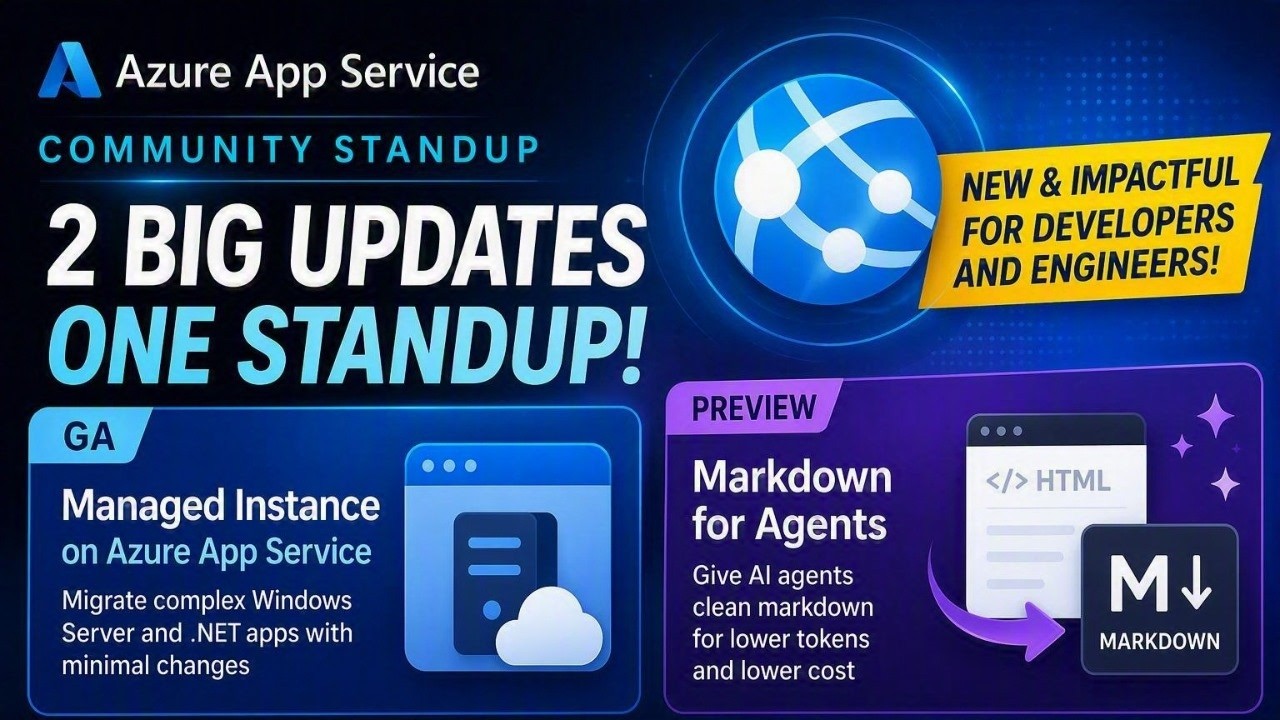
  <li>The general availability of <strong>Managed Instance on Azure App Service</strong>, a hosting option for Windows applications with operating system and infrastructure dependencies.</li>
  <li>The public preview of <strong>Markdown for Agents</strong>, which can convert an app’s HTML responses into cleaner, more token-efficient Markdown when a client requests it.</li>
  <li>New Azure CLI 2.90.0 capabilities, including <code class="language-plaintext highlighter-rouge">az webapp exec</code> for interactive shell access and detached command execution on Linux web apps.</li>
</ul>

<h2 id="watch-the-session">Watch the Session</h2>

<p><a href="https://www.youtube.com/watch?v=CLgc7dPJwoY"><img src="https://img.youtube.com/vi/CLgc7dPJwoY/maxresdefault.jpg" alt="Watch Azure App Service Community Standup: Managed Instance GA and Markdown for Agents" /></a></p>

<p><a href="https://www.youtube.com/watch?v=CLgc7dPJwoY">Watch on YouTube</a></p>

<h2 id="move-legacy-windows-applications-directly-to-paas">Move legacy Windows applications directly to PaaS</h2>

<p>Managed Instance on Azure App Service is designed for applications that cannot easily move to the standard App Service sandbox. These applications may depend on registry access, COM components, GAC assemblies, Windows services, MSI installers, custom fonts, mapped drives, network shares, or specific Windows features and runtimes.</p>

<p>Instead of moving these workloads to virtual machines or delaying migration for a complete rewrite, Managed Instance supports a <strong>lift-and-improve</strong> approach. You can preserve required dependencies while gaining App Service capabilities such as managed patching, scaling, deployment slots, authentication, managed identity, custom domains, and CI/CD.</p>

<p>During the demonstration, Andrew compared the same ASP.NET Web Forms application on standard App Service and Managed Instance. The application depended on:</p>

<ul>
  <li>A database connection value stored in the Windows registry.</li>
  <li>GDI-based chart generation.</li>
  <li>A third-party component for PDF export.</li>
</ul>

<p>The standard App Service sandbox blocked those operations. On Managed Instance, the application could run the existing functionality while also using managed identity to connect to Azure SQL.</p>

<p>Managed Instance provides plan-level configuration for these scenarios:</p>

<ul>
  <li><strong>Configuration scripts</strong> install Windows features, services, components, fonts, custom runtimes, and other dependencies when an instance starts.</li>
  <li><strong>Registry adapters</strong> securely provide registry values backed by Azure Key Vault.</li>
  <li><strong>Storage mounts</strong> support Azure Files, custom UNC paths, drive-letter mappings, and temporary local storage.</li>
  <li><strong>Azure Bastion access</strong> provides just-in-time RDP for diagnostics when the plan is integrated with a virtual network.</li>
</ul>

<p>Changes made interactively through RDP apply only to the current instance. Any configuration that must survive restarts, scaling, or platform maintenance should be captured in the installation script so App Service can reapply it consistently.</p>

<p>Managed Instance is generally available for Windows web apps in select regions on Premium v4 and Premium Memory-Optimized v4 plans.</p>

<h2 id="make-existing-websites-easier-for-agents-to-consume">Make existing websites easier for agents to consume</h2>

<p>Web pages contain scripts, styles, navigation, and other HTML that browsers need but AI agents often do not. Sending all of that markup to a model increases response size and token usage before the agent can reach the useful content.</p>

<p><strong>Markdown for Agents</strong>, now in public preview, lets App Service convert supported HTML responses into Markdown at the platform layer. After the feature is enabled, an agent requests Markdown through standard HTTP content negotiation:</p>

<div class="language-bash highlighter-rouge"><div class="highlight"><pre class="highlight"><code>curl <span class="nt">-i</span> <span class="se">\</span>
  <span class="nt">-H</span> <span class="s2">"Accept: text/markdown"</span> <span class="se">\</span>
  <span class="s2">"https://&lt;APP_NAME&gt;.azurewebsites.net/"</span>
</code></pre></div></div>

<p>A converted response uses <code class="language-plaintext highlighter-rouge">Content-Type: text/markdown; charset=utf-8</code> and includes the <code class="language-plaintext highlighter-rouge">x-markdown-source: easy-markdown</code> response header. Normal browser requests continue to receive the application’s original response, and the app’s existing authentication, authorization, and network access controls still apply.</p>

<p>The standup demo used a Contoso Outdoors site and reduced the response size by 81 percent without changing the application. Broader internal testing across more than 637,000 pages produced Markdown responses that were 97 percent smaller at the median, with a median conversion time of 2 milliseconds. Results vary by page and content.</p>

<p>During the public preview, Markdown for Agents is available for Windows apps in all Azure public regions on Basic or higher App Service plans. It can be enabled through <code class="language-plaintext highlighter-rouge">az rest</code>, ARM, or Bicep. The team also previewed an upcoming Azure portal experience that brings Markdown for Agents and built-in MCP together under a new AI configuration area. Linux support, dedicated Azure CLI commands, and the portal experience are planned for future updates.</p>

<h2 id="modernize-in-practical-steps">Modernize in practical steps</h2>

<p>Together, Managed Instance and Markdown for Agents demonstrate an incremental path for existing applications:</p>

<ol>
  <li>Move a Windows application and its dependencies to a managed App Service environment.</li>
  <li>Adopt platform capabilities such as managed identity, Key Vault, deployment slots, and autoscale.</li>
  <li>Make existing web content easier for agents to retrieve by enabling Markdown responses.</li>
  <li>Expose existing APIs as agent tools with App Service built-in MCP when the application has an OpenAPI specification.</li>
</ol>

<p>This approach lets teams modernize infrastructure and add AI-ready experiences without waiting for a full application rewrite.</p>

<h2 id="also-highlighted-azure-cli-2900">Also highlighted: Azure CLI 2.90.0</h2>

<p>The team also called out the Azure CLI 2.90.0 release. The new <code class="language-plaintext highlighter-rouge">az webapp exec</code> command provides a consistent way to open an interactive shell or start a detached command in a running Linux web app. A related platform improvement, rolling out separately, allows for BYO container scenarios to no longer require their own SSH server.</p>

<h2 id="resources">Resources</h2>

<ul>
  <li><a href="https://techcommunity.microsoft.com/blog/appsonazureblog/announcing-general-availability-of-managed-instance-on-azure-app-service/4541283">Announcing General Availability of Managed Instance on Azure App Service</a></li>
  <li><a href="https://learn.microsoft.com/azure/app-service/overview-managed-instance">Managed Instance on App Service overview</a></li>
  <li><a href="https://learn.microsoft.com/azure/app-service/quickstart-managed-instance">Deploy Managed Instance on Azure App Service</a></li>
  <li><a href="https://learn.microsoft.com/azure/app-service/configure-managed-instance">Configure Managed Instance on Azure App Service</a></li>
  <li><a href="https://github.com/Azure/Managed-Instance-on-Azure-App-Service">Managed Instance on Azure App Service GitHub repository</a></li>
  <li><a href="https://techcommunity.microsoft.com/blog/appsonazureblog/announcing-public-preview-markdown-for-agents-in-azure-app-service/4537023">Announcing public preview: Markdown for Agents in Azure App Service</a></li>
  <li><a href="https://learn.microsoft.com/azure/app-service/configure-mcp-built-in">Configure App Service built-in MCP</a></li>
  <li><a href="https://azure.github.io/AppService/2026/09/01/azure-cli-2-90-app-service-updates.html">What’s new for Azure App Service in Azure CLI 2.90.0</a></li>
  <li><a href="https://azure.github.io/AppService/2026/08/31/practical-path-to-ai-ready-applications.html">A Practical Path to Building AI-Ready Applications on Azure App Service</a></li>
</ul>]]></content><author><name>Azure App Service</name></author><category term="managed-instance" /><category term="ai-integration" /><category term="markdown" /><summary type="html"><![CDATA[Moving a legacy Windows application to the cloud and making an existing website easier for AI agents to use might sound like separate challenges. In the latest Azure App Service Community Standup, the team showed how App Service platform capabilities can help with both, often with few or no application code changes.]]></summary></entry><entry><title type="html">What’s new for Azure App Service in Azure CLI 2.90.0</title><link href="https://azure.github.io/2026/09/01/azure-cli-2-90-app-service-updates.html" rel="alternate" type="text/html" title="What’s new for Azure App Service in Azure CLI 2.90.0" /><published>2026-09-01T00:00:00+00:00</published><updated>2026-09-01T00:00:00+00:00</updated><id>https://azure.github.io/2026/09/01/azure-cli-2-90-app-service-updates</id><content type="html" xml:base="https://azure.github.io/2026/09/01/azure-cli-2-90-app-service-updates.html"><![CDATA[<p>Azure CLI 2.90.0 is now available and includes new capabilities and reliability improvements for Azure App Service. This release makes it easier to troubleshoot Linux web apps, work directly with running containers, identify deployments, and create App Service plans using the latest Isolated tier.</p>

<h2 id="connect-directly-to-linux-web-app-containers">Connect directly to Linux web app containers</h2>

<p>The existing <code class="language-plaintext highlighter-rouge">az webapp ssh</code> experience was designed primarily for interactive, human-operated sessions and could behave differently across client operating systems. On Windows, for example, it could open a browser-based WebSSH session instead of using the local terminal. This made cross-platform documentation, automation, and operational tooling difficult to standardize.</p>

<p>The new <code class="language-plaintext highlighter-rouge">az webapp exec</code> command, currently in preview, provides a consistent CLI surface for interactive shell access and detached command execution against running Linux web apps.</p>

<p>Open an interactive shell in the main app:</p>

<div class="language-bash highlighter-rouge"><div class="highlight"><pre class="highlight"><code>az webapp <span class="nb">exec</span> <span class="se">\</span>
  <span class="nt">--resource-group</span> &lt;resource-group&gt; <span class="se">\</span>
  <span class="nt">--name</span> &lt;web-app&gt;
</code></pre></div></div>

<p>Shell mode uses the local terminal on Windows, macOS, and Linux. By default, it connects to one app instance using <code class="language-plaintext highlighter-rouge">/bin/bash</code>. Use <code class="language-plaintext highlighter-rouge">--instance</code> to select a specific instance or <code class="language-plaintext highlighter-rouge">--shell</code> to use another shell, such as <code class="language-plaintext highlighter-rouge">/bin/sh</code>.</p>

<p>You can also connect to SCM (aka Kudu):</p>

<div class="language-bash highlighter-rouge"><div class="highlight"><pre class="highlight"><code>az webapp <span class="nb">exec</span> <span class="se">\</span>
  <span class="nt">--resource-group</span> &lt;resource-group&gt; <span class="se">\</span>
  <span class="nt">--name</span> &lt;web-app&gt; <span class="se">\</span>
  <span class="nt">--target</span> kudu
</code></pre></div></div>

<p>Execute mode starts a command without opening an interactive session. This is useful for triggering setup tasks, migrations, diagnostics, and long-running work from automation or agent-driven workflows. You can target one instance, a comma-separated list of instances, or every instance. Requests for multiple instances run in parallel.</p>

<p>For example, run a shell command on every instance and redirect its output to a file:</p>

<div class="language-bash highlighter-rouge"><div class="highlight"><pre class="highlight"><code>az webapp <span class="nb">exec</span> <span class="se">\</span>
  <span class="nt">--resource-group</span> &lt;resource-group&gt; <span class="se">\</span>
  <span class="nt">--name</span> &lt;web-app&gt; <span class="se">\</span>
  <span class="nt">--mode</span> execute <span class="se">\</span>
  <span class="nt">--instance</span> all <span class="se">\</span>
  <span class="nt">--shell-command</span> <span class="s2">"echo hello &gt; /home/LogFiles/output.txt 2&gt;&amp;1"</span>
</code></pre></div></div>

<p>Execute mode is fire-and-forget. An <code class="language-plaintext highlighter-rouge">accepted</code> result confirms that the platform accepted the request, not that the command completed successfully. The command runs detached, and the CLI does not return its standard output, standard error, or exit code. Use <code class="language-plaintext highlighter-rouge">--command</code> to invoke a program directly, <code class="language-plaintext highlighter-rouge">--shell-command</code> when you need shell operators such as <code class="language-plaintext highlighter-rouge">|</code>, <code class="language-plaintext highlighter-rouge">&amp;&amp;</code>, or <code class="language-plaintext highlighter-rouge">&gt;</code>, and <code class="language-plaintext highlighter-rouge">--working-directory</code> to choose an absolute working directory.</p>

<p>The command also supports deployment slots. This first preview focuses on interactive shell access and detached command execution; file transfer and port forwarding are not included.</p>

<h3 id="a-safer-path-for-custom-linux-containers">A safer path for custom Linux containers</h3>

<p>The legacy WebSSH model for custom Linux containers can require adding an OpenSSH server to the container image, embedding a root password, and listening on port 2222. Security-conscious teams may be unable to use that model because it conflicts with policies that prohibit plaintext secrets, SSH daemons, or multiple processes in production images. Reusing the same image outside App Service can also expose those image changes in environments that do not have App Service protections in front of the SSH port.</p>

<p>A related App Service platform improvement, planned to roll out separately later in September, uses Kudu as an authenticated proxy to attach directly to the running container. Once available for an app, this path removes the need to modify the image, embed an SSH credential, or run an SSH daemon. Availability may vary by App Service region while the platform rollout completes.</p>

<h3 id="control-ssh-access">Control SSH access</h3>

<p>Treat container shell access as a privileged operations capability and disable it on apps that do not need it. The <code class="language-plaintext highlighter-rouge">sshEnabled</code> property controls access at the app level. For example, disable SSH with:</p>

<div class="language-bash highlighter-rouge"><div class="highlight"><pre class="highlight"><code>az webapp config <span class="nb">set</span> <span class="se">\</span>
  <span class="nt">--resource-group</span> &lt;resource-group&gt; <span class="se">\</span>
  <span class="nt">--name</span> &lt;web-app&gt; <span class="se">\</span>
  <span class="nt">--generic-configurations</span> <span class="s1">'{"sshEnabled": false}'</span>
</code></pre></div></div>

<p>Set <code class="language-plaintext highlighter-rouge">sshEnabled</code> to <code class="language-plaintext highlighter-rouge">true</code> to enable access again. Add <code class="language-plaintext highlighter-rouge">--slot &lt;slot-name&gt;</code> to configure a deployment slot.</p>

<p>For governance across many apps, assign the built-in <strong>App Service apps should disable SSH</strong> and <strong>App Service app slots should disable SSH</strong> policies at the subscription or management-group scope. Assigning them at the tenant root management group applies the control across the tenant. Both policies default to <code class="language-plaintext highlighter-rouge">Audit</code> and can use <code class="language-plaintext highlighter-rouge">Deny</code> to prevent noncompliant app configurations. For policy IDs and assignment links, see the <a href="https://learn.microsoft.com/azure/app-service/policy-reference">Azure App Service built-in policy reference</a>.</p>

<h2 id="collect-network-captures-from-linux-web-apps">Collect network captures from Linux web apps</h2>

<p>A new preview troubleshooting command can collect a bounded packet capture from a Linux App Service worker:</p>

<div class="language-bash highlighter-rouge"><div class="highlight"><pre class="highlight"><code>az webapp troubleshoot collect network-capture <span class="se">\</span>
  <span class="nt">--resource-group</span> &lt;resource-group&gt; <span class="se">\</span>
  <span class="nt">--name</span> &lt;web-app&gt; <span class="se">\</span>
  <span class="nt">--duration</span> 30
</code></pre></div></div>

<p>The command uses Kudu to finalize and analyze the capture, then returns authenticated links to the packet capture and analysis report. Use <code class="language-plaintext highlighter-rouge">--collect-only</code> when you only need the raw capture.</p>

<h2 id="give-deployments-a-friendly-name">Give deployments a friendly name</h2>

<p><code class="language-plaintext highlighter-rouge">az webapp deploy</code> now supports <code class="language-plaintext highlighter-rouge">--tag</code>, allowing Linux web app deployments to carry a recognizable name:</p>

<div class="language-bash highlighter-rouge"><div class="highlight"><pre class="highlight"><code>az webapp deploy <span class="se">\</span>
  <span class="nt">--resource-group</span> &lt;resource-group&gt; <span class="se">\</span>
  <span class="nt">--name</span> &lt;web-app&gt; <span class="se">\</span>
  <span class="nt">--src-path</span> app.zip <span class="se">\</span>
  <span class="nt">--tag</span> september-production-release
</code></pre></div></div>

<p>This makes individual deployments easier to identify in deployment history and operational workflows.</p>

<h2 id="get-more-useful-web-app-creation-errors">Get more useful web app creation errors</h2>

<p>For Linux web apps, <code class="language-plaintext highlighter-rouge">az webapp create</code> adds the opt-in <code class="language-plaintext highlighter-rouge">--enriched-errors</code> parameter. When enabled, the CLI returns more detailed diagnostic information when creation fails:</p>

<div class="language-bash highlighter-rouge"><div class="highlight"><pre class="highlight"><code>az webapp create <span class="se">\</span>
  <span class="nt">--resource-group</span> &lt;resource-group&gt; <span class="se">\</span>
  <span class="nt">--plan</span> &lt;app-service-plan&gt; <span class="se">\</span>
  <span class="nt">--name</span> &lt;web-app&gt; <span class="se">\</span>
  <span class="nt">--runtime</span> <span class="s2">"PYTHON:3.13"</span> <span class="se">\</span>
  <span class="nt">--enriched-errors</span> <span class="nb">true</span>
</code></pre></div></div>

<p>This can help identify invalid runtime, container, and site configuration values without requiring additional troubleshooting steps.</p>

<h2 id="create-isolated-v4-app-service-plans">Create Isolated v4 App Service plans</h2>

<p>Azure CLI now recognizes the Isolated v4 SKUs for App Service Environment plans:</p>

<ul>
  <li><code class="language-plaintext highlighter-rouge">I1V4</code> through <code class="language-plaintext highlighter-rouge">I6V4</code></li>
  <li><code class="language-plaintext highlighter-rouge">I1MV4</code> through <code class="language-plaintext highlighter-rouge">I5MV4</code></li>
</ul>

<p>For example:</p>

<div class="language-bash highlighter-rouge"><div class="highlight"><pre class="highlight"><code>az appservice plan create <span class="se">\</span>
  <span class="nt">--resource-group</span> &lt;resource-group&gt; <span class="se">\</span>
  <span class="nt">--name</span> &lt;app-service-plan&gt; <span class="se">\</span>
  <span class="nt">--app-service-environment</span> &lt;ase-resource-id&gt; <span class="se">\</span>
  <span class="nt">--sku</span> I1V4
</code></pre></div></div>

<p>These SKUs are mapped to the <code class="language-plaintext highlighter-rouge">IsolatedV4</code> ARM tier. An App Service Environment is required, and zone-redundant plans are supported.</p>

<h2 id="app-service-configuration-and-plan-fixes">App Service configuration and plan fixes</h2>

<p>This release also addresses two important usability issues:</p>

<ul>
  <li><code class="language-plaintext highlighter-rouge">az webapp config set --generic-configurations</code> now preserves camelCase properties such as <code class="language-plaintext highlighter-rouge">webJobsEnabled</code>, whether supplied as <code class="language-plaintext highlighter-rouge">key=value</code> input or JSON.</li>
  <li>Windows examples for <code class="language-plaintext highlighter-rouge">az appservice plan create</code> now include <code class="language-plaintext highlighter-rouge">--is-linux false</code>. Because the command defaults to Linux when the option is omitted, this avoids accidentally creating a Linux plan when following a Windows example.</li>
</ul>

<h2 id="get-the-release">Get the release</h2>

<p>Upgrade to Azure CLI 2.90.0 or later, then verify the installed version:</p>

<div class="language-bash highlighter-rouge"><div class="highlight"><pre class="highlight"><code>az version
</code></pre></div></div>

<h2 id="summary">Summary</h2>

<p>Azure CLI 2.90.0 gives App Service users better container access, stronger troubleshooting tools, support for the latest isolated compute tier, and more predictable configuration behavior.</p>]]></content><author><name>Azure App Service</name></author><summary type="html"><![CDATA[Azure CLI 2.90.0 is now available and includes new capabilities and reliability improvements for Azure App Service. This release makes it easier to troubleshoot Linux web apps, work directly with running containers, identify deployments, and create App Service plans using the latest Isolated tier.]]></summary></entry><entry><title type="html">A Practical Path to Building AI-Ready Applications on Azure App Service</title><link href="https://azure.github.io/2026/08/31/practical-path-to-ai-ready-applications.html" rel="alternate" type="text/html" title="A Practical Path to Building AI-Ready Applications on Azure App Service" /><published>2026-08-31T00:00:00+00:00</published><updated>2026-08-31T00:00:00+00:00</updated><id>https://azure.github.io/2026/08/31/practical-path-to-ai-ready-applications</id><content type="html" xml:base="https://azure.github.io/2026/08/31/practical-path-to-ai-ready-applications.html"><![CDATA[<p>Migrating an existing Windows application to the cloud can be challenging when it depends on server roles, local storage, registry access, or third-party libraries. If technologies such as <code class="language-plaintext highlighter-rouge">System.Drawing</code>, Crystal Reports, MSMQ, Windows services, or drive-letter-based storage are blocking your migration, this recorded session is for you.</p>

<p>Perhaps rewriting the application would take months, or you no longer have access to all the original source code. Even after migrating, you may be wondering how to bring AI capabilities to the business logic you already have.</p>

<p>In <strong><a href="https://www.youtube.com/watch?v=TleupQT2ZOM">A Practical Path to Building AI-Ready Applications on Azure App Service</a></strong>, the team demonstrates how three Azure App Service capabilities can create a practical, incremental modernization path:</p>

<ul>
  <li><strong><a href="https://techcommunity.microsoft.com/blog/AppsonAzureBlog/announcing-general-availability-of-managed-instance-on-azure-app-service/4541283">Managed Instance on Azure App Service</a></strong> helps move Windows applications to a managed platform while preserving important operating system and application dependencies.</li>
  <li><strong><a href="https://learn.microsoft.com/azure/developer/github-copilot-app-modernization/">GitHub Copilot app modernization</a></strong> can assess applications and accelerate modernization when source code is available.</li>
  <li><strong><a href="https://learn.microsoft.com/azure/app-service/configure-mcp-built-in">Built-in MCP on Azure App Service</a></strong> can expose existing APIs as Model Context Protocol (MCP) tools, making them available to agents without requiring you to build and host a separate MCP server.</li>
</ul>

<p>The session also includes an end-to-end demonstration showing how these capabilities work together.</p>

<p>Instead of starting with a large, risky rewrite, you can <strong>lift, extend, and modernize</strong>: move the application first, take advantage of the managed Azure App Service platform, and then add modern and AI-powered experiences incrementally.</p>

<p>If you are facing a migration project that could take 6, 12, or even 18 months, watch the recording to see how this approach can help shorten and simplify the journey.</p>

<h2 id="watch-the-session">Watch the Session</h2>

<p><a href="https://www.youtube.com/watch?v=TleupQT2ZOM"><img src="https://img.youtube.com/vi/TleupQT2ZOM/maxresdefault.jpg" alt="Watch A Practical Path to Building AI-Ready Applications on Azure App Service" /></a></p>

<table>
  <tbody>
    <tr>
      <td><a href="https://developer.microsoft.com/en-us/reactor/events/27396/">Watch on Microsoft Reactor</a></td>
      <td><a href="https://www.youtube.com/watch?v=TleupQT2ZOM">Watch on YouTube</a></td>
    </tr>
  </tbody>
</table>

<h2 id="resources">Resources</h2>

<ul>
  <li><a href="https://techcommunity.microsoft.com/blog/AppsonAzureBlog/announcing-general-availability-of-managed-instance-on-azure-app-service/4541283">Announcing General Availability of Managed Instance on Azure App Service</a></li>
  <li><a href="https://learn.microsoft.com/azure/app-service/overview-managed-instance">Managed Instance on App Service overview</a></li>
  <li><a href="https://learn.microsoft.com/azure/app-service/quickstart-managed-instance">Deploy Managed Instance on Azure App Service</a></li>
  <li><a href="https://learn.microsoft.com/azure/app-service/configure-managed-instance">Configure Managed Instance on Azure App Service</a></li>
  <li><a href="https://github.com/Azure/Managed-Instance-on-Azure-App-Service">Managed Instance on Azure App Service GitHub repository</a></li>
  <li><a href="https://github.com/Azure-Samples/managed-instance-azure-app-service-quickstart">Managed Instance quickstart repository</a></li>
  <li><a href="https://github.com/gsethdev/devShop/tree/devshopASMIwithSQL">DevShop sample on GitHub</a></li>
  <li><a href="https://learn.microsoft.com/azure/app-service/configure-mcp-built-in">Configure App Service built-in MCP</a></li>
  <li><a href="https://learn.microsoft.com/azure/app-service/configure-authentication-mcp">Configure MCP server authorization</a></li>
  <li><a href="https://learn.microsoft.com/azure/developer/github-copilot-app-modernization/">GitHub Copilot App Modernization documentation</a></li>
  <li><a href="https://learn.microsoft.com/training/modules/intro-github-copilot-app-modernization/">Introduction to GitHub Copilot App Modernization</a></li>
  <li><a href="https://azure.github.io/AppService/2026/04/09/Agentic_IIS_Migration_to_Managed_Instance_On_AppService.html">Agentic IIS Migration to Managed Instance on Azure App Service</a></li>
  <li><a href="https://github.com/gsethdev/agenticmigration">IIS Migration MCP Server repository</a></li>
  <li><a href="https://learn.microsoft.com/cli/azure/appservice/plan/managed-instance/storage-mount?view=azure-cli-latest">Managed Instance storage-mount CLI reference</a></li>
  <li><a href="https://learn.microsoft.com/cli/azure/appservice/plan/managed-instance/install-script?view=azure-cli-latest">Managed Instance install-script CLI reference</a></li>
  <li><a href="https://learn.microsoft.com/cli/azure/appservice/plan/managed-instance/instance?view=azure-cli-latest">Managed Instance instance CLI reference</a></li>
</ul>]]></content><author><name>Azure App Service</name></author><category term="ai-integration" /><category term="managed-instance" /><category term="mcp" /><summary type="html"><![CDATA[Migrating an existing Windows application to the cloud can be challenging when it depends on server roles, local storage, registry access, or third-party libraries. If technologies such as System.Drawing, Crystal Reports, MSMQ, Windows services, or drive-letter-based storage are blocking your migration, this recorded session is for you.]]></summary></entry><entry><title type="html">What’s new for Azure App Service in Azure CLI 2.89.0</title><link href="https://azure.github.io/2026/08/04/azure-cli-2-89-app-service-updates.html" rel="alternate" type="text/html" title="What’s new for Azure App Service in Azure CLI 2.89.0" /><published>2026-08-04T00:00:00+00:00</published><updated>2026-08-04T00:00:00+00:00</updated><id>https://azure.github.io/2026/08/04/azure-cli-2-89-app-service-updates</id><content type="html" xml:base="https://azure.github.io/2026/08/04/azure-cli-2-89-app-service-updates.html"><![CDATA[<p><a href="https://learn.microsoft.com/cli/azure/release-notes-azure-cli#august-04-2026">Azure CLI 2.89.0</a> adds a new way to inspect Linux web app startup health across every running instance, making it easier to identify platform state and recent startup failures before opening individual logs.</p>

<h2 id="see-startup-health-across-every-linux-app-instance">See startup health across every Linux app instance</h2>

<p>The new <code class="language-plaintext highlighter-rouge">az webapp troubleshoot status</code> command, currently in preview, combines App Service runtime status with recent startup results from SCM (Kudu). By default, it returns structured data for every instance seen during the last 24 hours:</p>

<div class="language-bash highlighter-rouge"><div class="highlight"><pre class="highlight"><code>az webapp troubleshoot status <span class="se">\</span>
  <span class="nt">--resource-group</span> &lt;resource-group&gt; <span class="se">\</span>
  <span class="nt">--name</span> &lt;web-app&gt;
</code></pre></div></div>

<p>The result can include each instance’s current state and details, its latest startup error when one is available, and counts of recent successful and failed startup attempts. This gives you an app-wide overview before you inspect an individual startup log.</p>

<p>For a human-readable, color-coded view, add <code class="language-plaintext highlighter-rouge">--report</code>:</p>

<div class="language-bash highlighter-rouge"><div class="highlight"><pre class="highlight"><code>az webapp troubleshoot status <span class="se">\</span>
  <span class="nt">--resource-group</span> &lt;resource-group&gt; <span class="se">\</span>
  <span class="nt">--name</span> &lt;web-app&gt; <span class="se">\</span>
  <span class="nt">--report</span>
</code></pre></div></div>

<p>Use <code class="language-plaintext highlighter-rouge">--instance</code> with either an ARM instance ID or a machine name to inspect one worker. Add <code class="language-plaintext highlighter-rouge">--slot &lt;slot-name&gt;</code> to troubleshoot a deployment slot.</p>

<p>This command supports Linux web apps. If the startup-summary endpoint is not yet available for an app, the command reports that status instead of presenting missing startup data as zero attempts. Runtime status may still be available while the supporting App Service capability rolls out across regions.</p>

<h2 id="get-the-release">Get the release</h2>

<p>Run <code class="language-plaintext highlighter-rouge">az upgrade</code> to install the latest available Azure CLI release, then verify the installed version:</p>

<div class="language-bash highlighter-rouge"><div class="highlight"><pre class="highlight"><code>az upgrade
az version
</code></pre></div></div>]]></content><author><name>Azure App Service</name></author><summary type="html"><![CDATA[Azure CLI 2.89.0 adds a new way to inspect Linux web app startup health across every running instance, making it easier to identify platform state and recent startup failures before opening individual logs.]]></summary></entry><entry><title type="html">A simpler way to deploy ZIP packages to Azure App Service from the Azure portal</title><link href="https://azure.github.io/2026/07/30/quick-deploy-portal.html" rel="alternate" type="text/html" title="A simpler way to deploy ZIP packages to Azure App Service from the Azure portal" /><published>2026-07-30T00:00:00+00:00</published><updated>2026-07-30T00:00:00+00:00</updated><id>https://azure.github.io/2026/07/30/quick-deploy-portal</id><content type="html" xml:base="https://azure.github.io/2026/07/30/quick-deploy-portal.html"><![CDATA[<p>We recently introduced a simpler way to deploy applications to Azure App Service for Linux by uploading a ZIP package through Kudu. The experience lets you review the package contents, choose whether to run a server-side build, and follow the deployment through its different stages.</p>

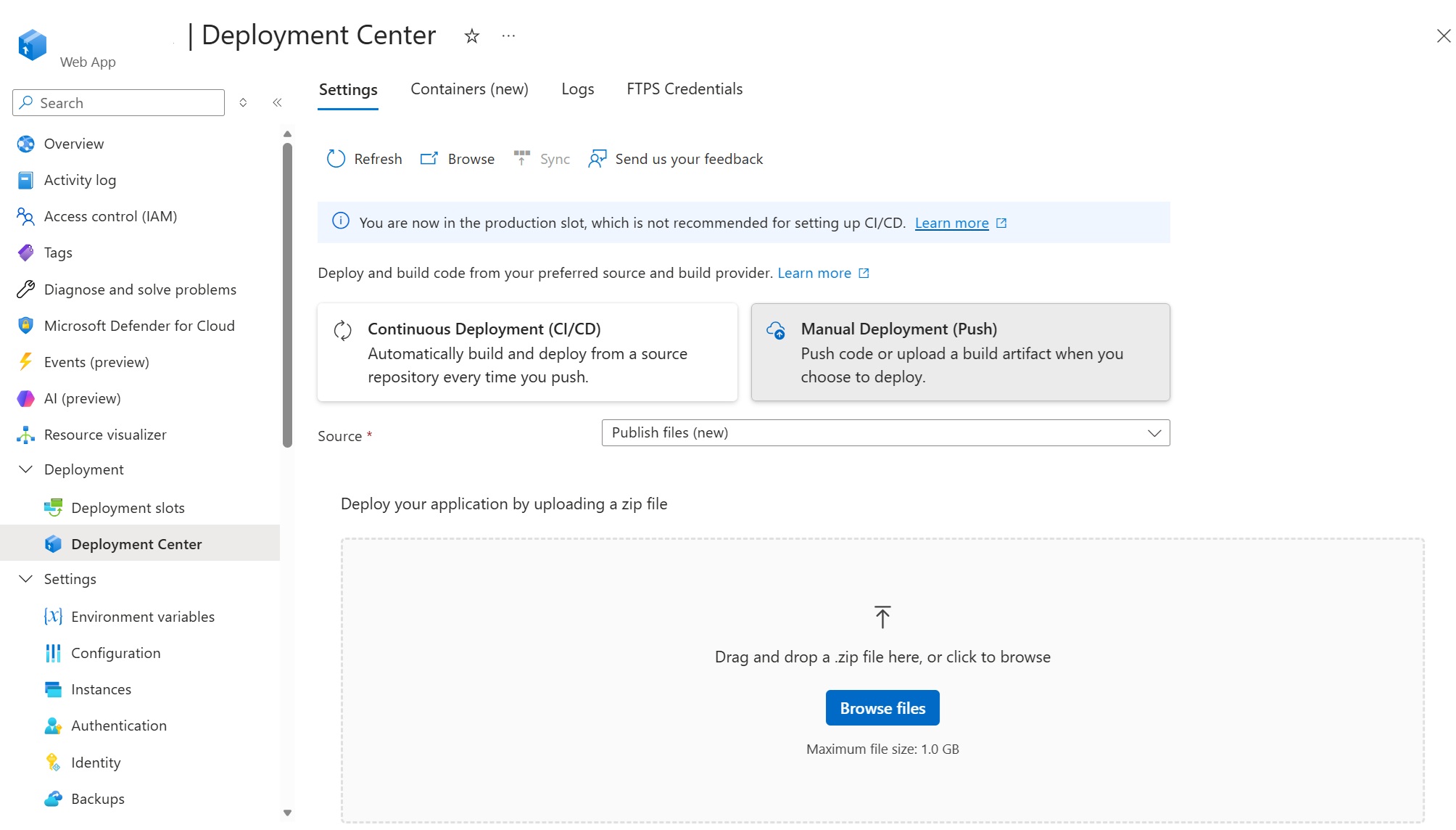
<p>This capability is now available directly in the <strong>Azure portal</strong> through <strong>Deployment Center</strong>.</p>

<p>To use it:</p>

<ol>
  <li>Open your Linux web app in the Azure portal.</li>
  <li>Go to <strong>Deployment Center</strong>.</li>
  <li>Select <strong>Manual Deployment (Push)</strong>.</li>
  <li>Choose <strong>Publish files (new)</strong> as the source.</li>
  <li>Drag and drop your ZIP file or select <strong>Browse files</strong>.</li>
</ol>

<p><img src="/media/2026/07/quick-deploy-portal.jpg" alt="quickdeploy" /></p>

<p>You can now upload and deploy your application without navigating separately to the Kudu site. This is useful for getting started, testing an application, or performing an occasional manual deployment. For repeatable production deployments, we recommend configuring a CI/CD pipeline.</p>

<p>To learn more about the deployment experience, including package preview, build options, progress tracking, and deployment logs, see our previous post: <strong><a href="https://azure.github.io/AppService/2026/04/06/quickdeploy.html">A simpler way to deploy your code to Azure App Service for Linux</a></strong>.</p>]]></content><author><name>Azure App Service</name></author><summary type="html"><![CDATA[We recently introduced a simpler way to deploy applications to Azure App Service for Linux by uploading a ZIP package through Kudu. The experience lets you review the package contents, choose whether to run a server-side build, and follow the deployment through its different stages.]]></summary></entry><entry><title type="html">Give your AI agent two memories with Azure App Service</title><link href="https://azure.github.io/2026/07/15/give-your-ai-agent-two-memories.html" rel="alternate" type="text/html" title="Give your AI agent two memories with Azure App Service" /><published>2026-07-15T00:00:00+00:00</published><updated>2026-07-15T00:00:00+00:00</updated><id>https://azure.github.io/2026/07/15/give-your-ai-agent-two-memories</id><content type="html" xml:base="https://azure.github.io/2026/07/15/give-your-ai-agent-two-memories.html"><![CDATA[<p>Agents feel continuous only when they can operate across two very different time horizons. They
need the recent turns that make the current conversation coherent, and they need a smaller set of
durable facts that can follow an authenticated user into a new conversation.</p>

<p>This sample implements both horizons on Azure App Service with Microsoft Agent Framework, Azure
Managed Redis, Azure Cosmos DB for NoSQL vector search, and Azure OpenAI. It is deployed and
available as a complete reference implementation with a browser UI, deterministic local mode,
tests, Bicep, and Azure Developer CLI support.</p>

<p><strong>Sample:</strong> <a href="https://github.com/seligj95/app-service-agent-memory">https://github.com/seligj95/app-service-agent-memory</a></p>

<h2 id="why-one-memory-store-is-not-enough">Why one memory store is not enough</h2>

<p>Conversation history and durable memory have different jobs.</p>

<p><strong>Conversation history</strong> is ordered, session-specific, frequently updated, and naturally
short-lived. The agent needs it to resolve statements such as “use the second option” or “what did
I just say?”</p>

<p><strong>Durable memory</strong> is selective, user-scoped, and useful across sessions. It holds facts such as a
preferred deployment region, product name, accessibility need, or writing preference. Retrieval is
semantic rather than chronological.</p>

<p>Putting both into one unbounded prompt makes cost, latency, privacy, and deletion harder to reason
about. The sample instead gives each horizon a purpose-built store and joins them through the Agent
Framework context pipeline.</p>

<h2 id="the-azure-architecture">The Azure architecture</h2>

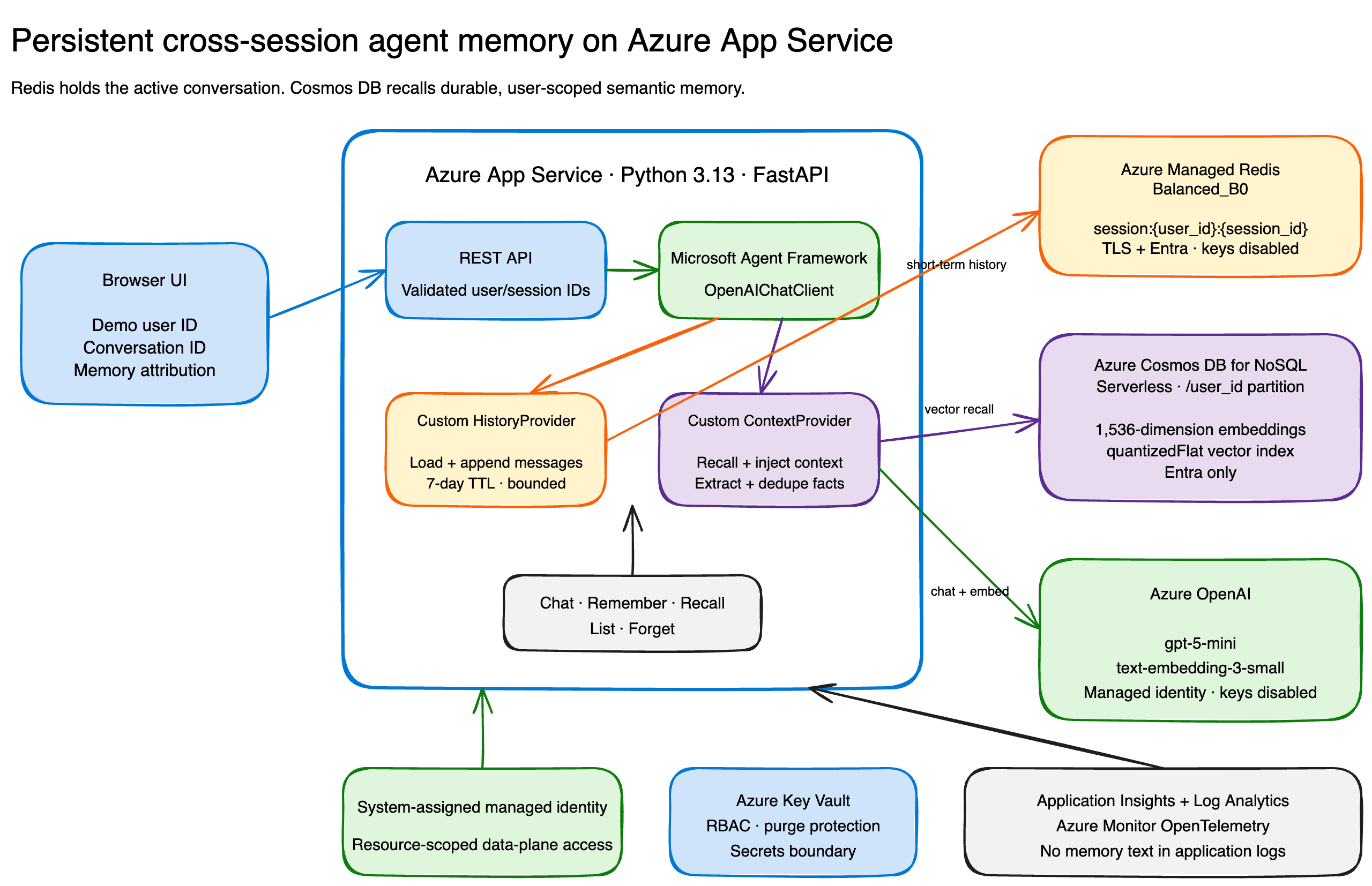
<p><img src="/media/2026/07/agent-memory-architecture.png" alt="Persistent agent memory architecture" /></p>

<p>The public FastAPI application runs on one always-on App Service Premium v4 instance with Python
3.13. The browser creates demo user and conversation IDs in local storage. That keeps the sample
easy to explore, but it is not production authentication.</p>

<p>For every chat turn, the application:</p>

<ol>
  <li>Validates the user ID, session ID, message, and retrieval limit.</li>
  <li>Loads bounded conversation history from Azure Managed Redis.</li>
  <li>Creates an embedding for the new input.</li>
  <li>Runs a partition-scoped vector query in Cosmos DB for the same user.</li>
  <li>Adds relevant durable memories to the Agent Framework context.</li>
  <li>Runs <code class="language-plaintext highlighter-rouge">gpt-5-mini</code>.</li>
  <li>Stores the new conversation messages in Redis and refreshes their TTL.</li>
  <li>Extracts conservative durable facts, embeds them, deduplicates them, and upserts them to Cosmos
DB.</li>
</ol>

<p>The chat response also returns memory attribution so the UI can show that a memory influenced the
turn.</p>

<h2 id="short-term-history-with-a-custom-historyprovider">Short-term history with a custom HistoryProvider</h2>

<p>Agent Framework’s current Python API makes history a context provider. The custom provider only
implements the storage boundary; the framework handles when to load and persist messages.</p>

<div class="language-python highlighter-rouge"><div class="highlight"><pre class="highlight"><code><span class="k">class</span> <span class="nc">RedisHistoryProvider</span><span class="p">(</span><span class="n">HistoryProvider</span><span class="p">):</span>
    <span class="k">def</span> <span class="nf">__init__</span><span class="p">(</span><span class="n">self</span><span class="p">,</span> <span class="n">store</span><span class="p">,</span> <span class="n">ttl_seconds</span><span class="p">,</span> <span class="n">max_messages</span><span class="o">=</span><span class="mi">40</span><span class="p">):</span>
        <span class="nf">super</span><span class="p">().</span><span class="nf">__init__</span><span class="p">(</span><span class="sh">"</span><span class="s">redis-history</span><span class="sh">"</span><span class="p">)</span>
        <span class="n">self</span><span class="p">.</span><span class="n">_store</span> <span class="o">=</span> <span class="n">store</span>
        <span class="n">self</span><span class="p">.</span><span class="n">_ttl_seconds</span> <span class="o">=</span> <span class="n">ttl_seconds</span>
        <span class="n">self</span><span class="p">.</span><span class="n">_max_messages</span> <span class="o">=</span> <span class="n">max_messages</span>

    <span class="k">async</span> <span class="k">def</span> <span class="nf">get_messages</span><span class="p">(</span><span class="n">self</span><span class="p">,</span> <span class="n">session_id</span><span class="p">,</span> <span class="o">*</span><span class="p">,</span> <span class="n">state</span><span class="o">=</span><span class="bp">None</span><span class="p">,</span> <span class="o">**</span><span class="n">kwargs</span><span class="p">):</span>
        <span class="n">user_id</span> <span class="o">=</span> <span class="nf">_required_state_value</span><span class="p">(</span><span class="n">state</span><span class="p">,</span> <span class="sh">"</span><span class="s">user_id</span><span class="sh">"</span><span class="p">)</span>
        <span class="n">values</span> <span class="o">=</span> <span class="k">await</span> <span class="n">self</span><span class="p">.</span><span class="n">_store</span><span class="p">.</span><span class="nf">load</span><span class="p">(</span><span class="n">user_id</span><span class="p">,</span> <span class="n">session_id</span><span class="p">)</span>
        <span class="k">return</span> <span class="p">[</span><span class="n">Message</span><span class="p">.</span><span class="nf">from_dict</span><span class="p">(</span><span class="n">json</span><span class="p">.</span><span class="nf">loads</span><span class="p">(</span><span class="n">value</span><span class="p">))</span> <span class="k">for</span> <span class="n">value</span> <span class="ow">in</span> <span class="n">values</span><span class="p">[</span><span class="o">-</span><span class="n">self</span><span class="p">.</span><span class="n">_max_messages</span><span class="p">:]]</span>

    <span class="k">async</span> <span class="k">def</span> <span class="nf">save_messages</span><span class="p">(</span><span class="n">self</span><span class="p">,</span> <span class="n">session_id</span><span class="p">,</span> <span class="n">messages</span><span class="p">,</span> <span class="o">*</span><span class="p">,</span> <span class="n">state</span><span class="o">=</span><span class="bp">None</span><span class="p">,</span> <span class="o">**</span><span class="n">kwargs</span><span class="p">):</span>
        <span class="n">user_id</span> <span class="o">=</span> <span class="nf">_required_state_value</span><span class="p">(</span><span class="n">state</span><span class="p">,</span> <span class="sh">"</span><span class="s">user_id</span><span class="sh">"</span><span class="p">)</span>
        <span class="n">values</span> <span class="o">=</span> <span class="p">[</span><span class="n">json</span><span class="p">.</span><span class="nf">dumps</span><span class="p">(</span><span class="n">message</span><span class="p">.</span><span class="nf">to_dict</span><span class="p">())</span> <span class="k">for</span> <span class="n">message</span> <span class="ow">in</span> <span class="n">messages</span><span class="p">]</span>
        <span class="k">await</span> <span class="n">self</span><span class="p">.</span><span class="n">_store</span><span class="p">.</span><span class="nf">append</span><span class="p">(</span>
            <span class="n">user_id</span><span class="p">,</span> <span class="n">session_id</span><span class="p">,</span> <span class="n">values</span><span class="p">,</span> <span class="n">self</span><span class="p">.</span><span class="n">_ttl_seconds</span><span class="p">,</span> <span class="n">self</span><span class="p">.</span><span class="n">_max_messages</span>
        <span class="p">)</span>
</code></pre></div></div>

<p>The Redis key is <code class="language-plaintext highlighter-rouge">session:{user_id}:{session_id}</code>. Each append also trims the list and refreshes the
seven-day TTL. Serializing the complete Agent Framework <code class="language-plaintext highlighter-rouge">Message</code> preserves tool and attribution
metadata instead of reducing history to plain strings.</p>

<h2 id="durable-recall-with-a-custom-contextprovider">Durable recall with a custom ContextProvider</h2>

<p>The durable provider participates before and after the model call.</p>

<div class="language-python highlighter-rouge"><div class="highlight"><pre class="highlight"><code><span class="k">class</span> <span class="nc">CosmosContextProvider</span><span class="p">(</span><span class="n">ContextProvider</span><span class="p">):</span>
    <span class="k">async</span> <span class="k">def</span> <span class="nf">before_run</span><span class="p">(</span><span class="n">self</span><span class="p">,</span> <span class="o">*</span><span class="p">,</span> <span class="n">agent</span><span class="p">,</span> <span class="n">session</span><span class="p">,</span> <span class="n">context</span><span class="p">,</span> <span class="n">state</span><span class="p">):</span>
        <span class="n">user_id</span> <span class="o">=</span> <span class="nf">_required_state_value</span><span class="p">(</span><span class="n">state</span><span class="p">,</span> <span class="sh">"</span><span class="s">user_id</span><span class="sh">"</span><span class="p">)</span>
        <span class="n">embedding</span> <span class="o">=</span> <span class="k">await</span> <span class="n">self</span><span class="p">.</span><span class="n">_embeddings</span><span class="p">.</span><span class="nf">embed</span><span class="p">(</span><span class="nf">_latest_input_text</span><span class="p">(</span><span class="n">context</span><span class="p">))</span>
        <span class="n">recalled</span> <span class="o">=</span> <span class="k">await</span> <span class="n">self</span><span class="p">.</span><span class="n">_store</span><span class="p">.</span><span class="nf">recall</span><span class="p">(</span><span class="n">user_id</span><span class="p">,</span> <span class="n">embedding</span><span class="p">,</span> <span class="n">self</span><span class="p">.</span><span class="n">_recall_limit</span><span class="p">)</span>
        <span class="n">state</span><span class="p">[</span><span class="sh">"</span><span class="s">recalled_memories</span><span class="sh">"</span><span class="p">]</span> <span class="o">=</span> <span class="p">[</span><span class="n">item</span><span class="p">.</span><span class="nf">model_dump</span><span class="p">(</span><span class="n">mode</span><span class="o">=</span><span class="sh">"</span><span class="s">json</span><span class="sh">"</span><span class="p">)</span> <span class="k">for</span> <span class="n">item</span> <span class="ow">in</span> <span class="n">recalled</span><span class="p">]</span>

        <span class="k">if</span> <span class="n">recalled</span><span class="p">:</span>
            <span class="n">facts</span> <span class="o">=</span> <span class="sh">"</span><span class="se">\n</span><span class="sh">"</span><span class="p">.</span><span class="nf">join</span><span class="p">(</span><span class="sa">f</span><span class="sh">"</span><span class="s">- </span><span class="si">{</span><span class="n">item</span><span class="p">.</span><span class="n">text</span><span class="si">}</span><span class="sh">"</span> <span class="k">for</span> <span class="n">item</span> <span class="ow">in</span> <span class="n">recalled</span><span class="p">)</span>
            <span class="n">context</span><span class="p">.</span><span class="nf">extend_instructions</span><span class="p">(</span>
                <span class="n">self</span><span class="p">.</span><span class="n">source_id</span><span class="p">,</span>
                <span class="sh">"</span><span class="s">Use these durable memories only when relevant:</span><span class="se">\n</span><span class="sh">"</span> <span class="o">+</span> <span class="n">facts</span><span class="p">,</span>
            <span class="p">)</span>

    <span class="k">async</span> <span class="k">def</span> <span class="nf">after_run</span><span class="p">(</span><span class="n">self</span><span class="p">,</span> <span class="o">*</span><span class="p">,</span> <span class="n">agent</span><span class="p">,</span> <span class="n">session</span><span class="p">,</span> <span class="n">context</span><span class="p">,</span> <span class="n">state</span><span class="p">):</span>
        <span class="k">for</span> <span class="n">fact</span><span class="p">,</span> <span class="n">category</span> <span class="ow">in</span> <span class="nf">extract_durable_facts</span><span class="p">(</span><span class="nf">_latest_input_text</span><span class="p">(</span><span class="n">context</span><span class="p">)):</span>
            <span class="n">embedding</span> <span class="o">=</span> <span class="k">await</span> <span class="n">self</span><span class="p">.</span><span class="n">_embeddings</span><span class="p">.</span><span class="nf">embed</span><span class="p">(</span><span class="n">fact</span><span class="p">)</span>
            <span class="k">await</span> <span class="n">self</span><span class="p">.</span><span class="n">_store</span><span class="p">.</span><span class="nf">remember</span><span class="p">(</span>
                <span class="n">state</span><span class="p">[</span><span class="sh">"</span><span class="s">user_id</span><span class="sh">"</span><span class="p">],</span> <span class="n">fact</span><span class="p">,</span> <span class="n">category</span><span class="p">,</span> <span class="n">state</span><span class="p">[</span><span class="sh">"</span><span class="s">source_turn</span><span class="sh">"</span><span class="p">],</span> <span class="n">embedding</span>
            <span class="p">)</span>
</code></pre></div></div>

<p>The Cosmos container uses <code class="language-plaintext highlighter-rouge">/user_id</code> as its partition key and a 1,536-dimension cosine
<code class="language-plaintext highlighter-rouge">quantizedFlat</code> vector index. Recall is always routed to one user’s partition and is bounded to a
small TOP N result set. A stable ID derived from the user scope and normalized content hash makes
writes idempotent.</p>

<h2 id="passwordless-by-default">Passwordless by default</h2>

<p>App Service uses its system-assigned managed identity for every data service.</p>

<ul>
  <li><strong>Azure OpenAI:</strong> <code class="language-plaintext highlighter-rouge">Cognitive Services OpenAI User</code></li>
  <li><strong>Cosmos DB:</strong> native built-in data contributor</li>
  <li><strong>Key Vault:</strong> <code class="language-plaintext highlighter-rouge">Key Vault Secrets User</code></li>
  <li><strong>Azure Managed Redis:</strong> database-scoped Entra access-policy assignment</li>
</ul>

<p>Azure OpenAI and Cosmos DB local authentication are disabled. Redis requires TLS and Entra
authentication, and its access keys are disabled. The application explicitly selects
<code class="language-plaintext highlighter-rouge">ManagedIdentityCredential</code> in Azure and <code class="language-plaintext highlighter-rouge">AzureCliCredential</code> for local real-service development.
It does not use a broad production credential chain.</p>

<p>Key Vault remains the secrets boundary for future extensions, although this passwordless sample
does not need a runtime secret.</p>

<h2 id="try-it-locally-without-azure">Try it locally without Azure</h2>

<p>The deterministic fake mode exercises the real provider pipeline and complete UI without an Azure
subscription:</p>

<div class="language-bash highlighter-rouge"><div class="highlight"><pre class="highlight"><code>uv <span class="nb">sync</span> <span class="nt">--python</span> 3.13 <span class="nt">--all-groups</span>
uv run uvicorn app.main:app <span class="nt">--reload</span>
</code></pre></div></div>

<p>Open <code class="language-plaintext highlighter-rouge">http://127.0.0.1:8000</code>, tell the agent “My favorite launch color is teal,” start a new
conversation, and ask for the color. You can inspect attribution, list the stored memory, and
forget it.</p>

<h2 id="deploy-with-azure-developer-cli">Deploy with Azure Developer CLI</h2>

<p>After creating an azd environment and setting its subscription and supported region, deployment is
one command:</p>

<div class="language-bash highlighter-rouge"><div class="highlight"><pre class="highlight"><code>azd up <span class="nt">--no-prompt</span>
</code></pre></div></div>

<p>The Bicep creates App Service, Managed Redis, Cosmos DB, Azure OpenAI model deployments, Key Vault,
Application Insights, and Log Analytics. A smoke test then checks health, same-session history,
explicit remember, new-session recall, list, forget, and absence after forget.</p>

<p>Azure Managed Redis availability is subscription- and region-dependent. The deployed reference
uses East US 2 after the service preflight rejected East US for this subscription.</p>

<h2 id="what-the-demo-deliberately-does-not-hide">What the demo deliberately does not hide</h2>

<p>The browser identity is anonymous and user-controlled. That is useful for understanding the data
flow, but a production application must replace it with authenticated claims and authorization on
every memory operation.</p>

<p>The sample also keeps one App Service instance. Before scaling out, replace the in-process
conversation lock with a distributed lock so concurrent requests cannot reorder one session’s
history.</p>

<p>Other production work includes private endpoints and VNet integration, consent and retention
policy, user export and deletion, content safety, prompt-injection defenses, abuse throttling,
per-user quotas, and evaluation of retrieval thresholds.</p>

<h2 id="learn-more">Learn more</h2>

<ul>
  <li><a href="https://learn.microsoft.com/agent-framework/get-started/memory">Microsoft Agent Framework memory</a></li>
  <li><a href="https://learn.microsoft.com/agent-framework/agents/conversations/context-providers">Agent Framework context providers</a></li>
  <li><a href="https://learn.microsoft.com/azure/app-service/configure-language-python">Configure Python on Azure App Service</a></li>
  <li><a href="https://learn.microsoft.com/azure/redis/entra-for-authentication">Use Microsoft Entra ID with Azure Managed Redis</a></li>
  <li><a href="https://learn.microsoft.com/azure/cosmos-db/how-to-python-vector-index-query">Vector search in Azure Cosmos DB for NoSQL</a></li>
  <li><a href="https://learn.microsoft.com/azure/developer/ai/keyless-connections">Use Azure OpenAI without keys</a></li>
</ul>

<p>Two memory horizons make the agent easier to operate and easier to trust: session history remains
temporary, durable memory remains selective and user-scoped, and both have explicit lifecycle
controls.</p>]]></content><author><name>Azure App Service</name></author><summary type="html"><![CDATA[Agents feel continuous only when they can operate across two very different time horizons. They need the recent turns that make the current conversation coherent, and they need a smaller set of durable facts that can follow an authenticated user into a new conversation.]]></summary></entry><entry><title type="html">A Better Way to View Logs in Kudu for Azure App Service on Linux</title><link href="https://azure.github.io/2026/06/12/kudu-logs.html" rel="alternate" type="text/html" title="A Better Way to View Logs in Kudu for Azure App Service on Linux" /><published>2026-06-12T00:00:00+00:00</published><updated>2026-06-12T00:00:00+00:00</updated><id>https://azure.github.io/2026/06/12/kudu-logs</id><content type="html" xml:base="https://azure.github.io/2026/06/12/kudu-logs.html"><![CDATA[<p>Logs are often the fastest way to understand what is happening inside your application. Whether you are investigating startup behavior, runtime errors, failed requests, dependency issues, or unexpected application behavior, having the right log view can make troubleshooting much easier.</p>

<p>To make this easier, we have added a new <strong>Log stream</strong> page in Kudu for Azure App Service on Linux, available under the <strong>Logs</strong> dropdown. This experience gives you a single place to stream, browse, search, and filter logs so you can understand what is happening in your app faster.</p>

<hr />

<h3 id="opening-the-logs-page">Opening the Logs page</h3>

<p>You can open Kudu from the Azure portal:</p>

<ol>
  <li>Go to your <strong>App Service</strong>.</li>
  <li>Select <strong>Advanced Tools</strong>.</li>
  <li>Click <strong>Go</strong>.</li>
</ol>

<p>You can also open Kudu directly by going to:</p>

<div class="language-text highlighter-rouge"><div class="highlight"><pre class="highlight"><code>https://&lt;app-name&gt;.scm.azurewebsites.net
</code></pre></div></div>

<p>From there, open the <strong>Logs</strong> page.</p>

<hr />

<h3 id="view-live-logs-across-your-app-and-platform">View live logs across your app and platform</h3>

<p>The Logs page lets you view logs as they are being written, with filters for <strong>timeframe</strong>, <strong>instance</strong>, <strong>container</strong>, <strong>log type</strong>, and <strong>level</strong>.</p>

<p>This helps when you want to focus on a specific instance, look only at errors, or separate application logs from platform events.</p>

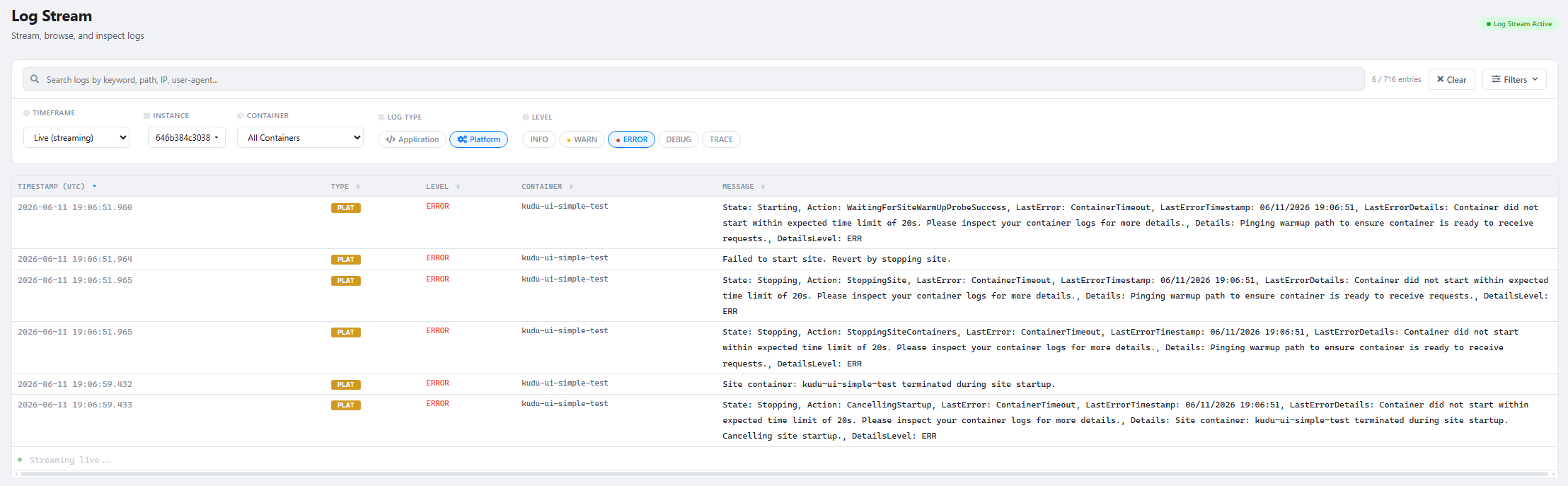
<p><img src="/media/2026/06/platform-logs.png" alt="kudulogs" /></p>

<p>For example, you can use platform logs to understand container lifecycle events, restarts, startup behavior, warmup probe activity, and other platform-side events related to your app.</p>

<hr />

<h3 id="quickly-find-the-log-entries-that-matter">Quickly find the log entries that matter</h3>

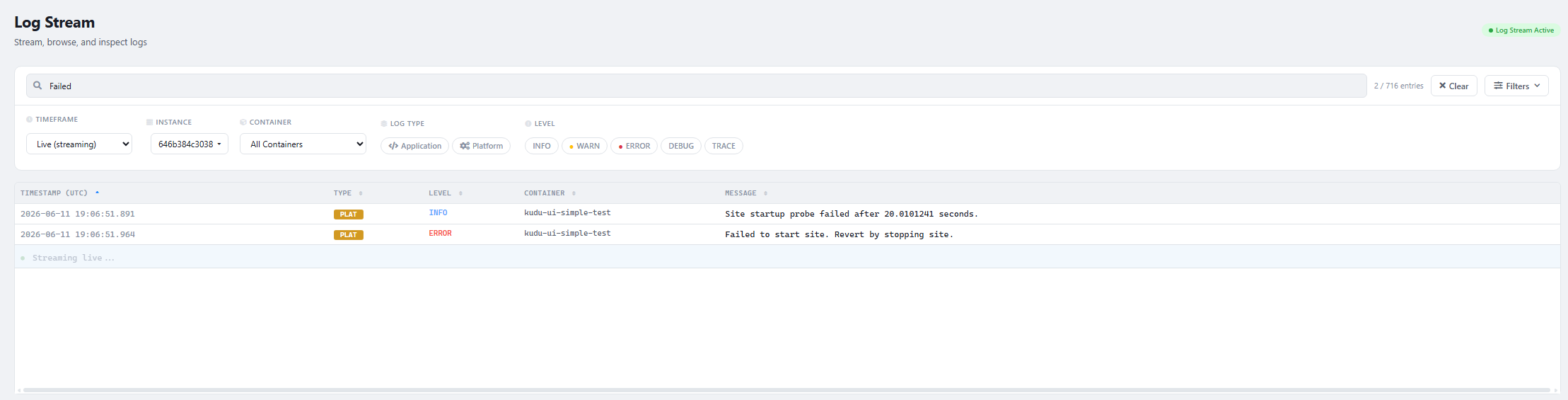
<p>You can use keyword search to narrow down the log stream or historical logs. This is useful when you are looking for a specific error message, request path, exception, dependency failure, timeout, or any application-specific keyword.</p>

<p><img src="/media/2026/06/keyword-search.png" alt="kudulogs" /></p>

<p>Instead of scanning through hundreds of entries, you can search for the terms that are relevant to the issue you are investigating.</p>

<hr />

<h3 id="investigate-issues-within-a-specific-timeframe">Investigate issues within a specific timeframe</h3>

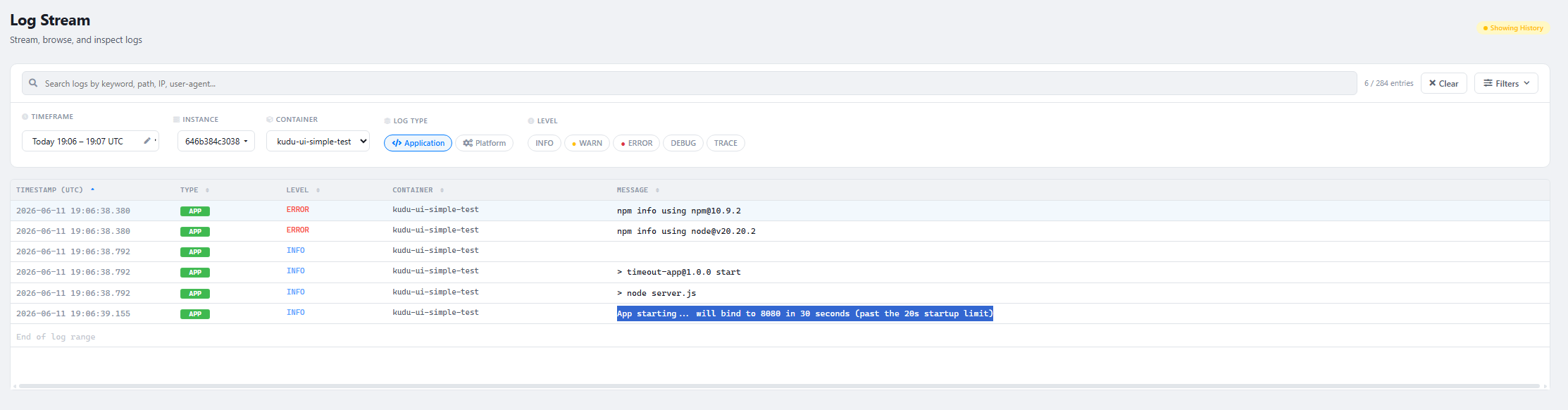
<p>The Log stream page also supports viewing logs for a selected time range. This is useful when you know when an issue occurred and want to inspect both application and platform activity around that time.</p>

<p>For example, you can filter to a specific timeframe, switch to <strong>Application</strong> logs, and check what your app was doing when the issue happened.</p>

<p><img src="/media/2026/06/timestamp-search.png" alt="kudulogs" /></p>

<p>This can help you troubleshoot scenarios such as failed requests, application exceptions, slow startup, container restarts, dependency issues, or configuration problems.</p>

<hr />

<h3 id="summary">Summary</h3>

<p>The new Log stream page in Kudu makes it easier to work with logs for Azure App Service on Linux. With live streaming, keyword search, historical views, and filters for application and platform logs, you can quickly narrow down the information you need and troubleshoot issues more efficiently.</p>

<p>We are continuing to improve the App Service Linux experience to make diagnostics simpler and more useful for day-to-day development and operations.</p>]]></content><author><name>Azure App Service</name></author><summary type="html"><![CDATA[Logs are often the fastest way to understand what is happening inside your application. Whether you are investigating startup behavior, runtime errors, failed requests, dependency issues, or unexpected application behavior, having the right log view can make troubleshooting much easier.]]></summary></entry><entry><title type="html">Debug App Startup Faster on Azure App Service for Linux with Startup Logs</title><link href="https://azure.github.io/2026/06/10/azcli-startuplogs.html" rel="alternate" type="text/html" title="Debug App Startup Faster on Azure App Service for Linux with Startup Logs" /><published>2026-06-10T00:00:00+00:00</published><updated>2026-06-10T00:00:00+00:00</updated><id>https://azure.github.io/2026/06/10/azcli-startuplogs</id><content type="html" xml:base="https://azure.github.io/2026/06/10/azcli-startuplogs.html"><![CDATA[<p>When an app fails to start on Azure App Service for Linux, one of the first things you need is visibility into what happened during startup. This can include container initialization, runtime setup, startup command execution, application output, and warmup probe results.</p>

<p>To make this easier, we have added new Azure CLI commands that let you list and view App Service startup logs directly from the command line.</p>

<h2 id="list-available-startup-logs">List available startup logs</h2>

<p>You can list startup logs for an app using:</p>

<div class="language-bash highlighter-rouge"><div class="highlight"><pre class="highlight"><code>az webapp log startup list <span class="se">\</span>
  <span class="nt">--name</span> &lt;app-name&gt; <span class="se">\</span>
  <span class="nt">--resource-group</span> &lt;resource-group&gt;
</code></pre></div></div>

<p>The output shows whether the startup attempt succeeded or failed, along with the instance name and log file size. This helps you quickly identify the right log file, especially when there are multiple startup attempts across different instances.</p>

<p><img src="/media/2026/06/log-list.png" alt="startuplog" /></p>

<h2 id="show-startup-log-content">Show startup log content</h2>

<p>To view the latest startup log, run:</p>

<div class="language-bash highlighter-rouge"><div class="highlight"><pre class="highlight"><code>az webapp log startup show <span class="se">\</span>
  <span class="nt">--name</span> &lt;app-name&gt; <span class="se">\</span>
  <span class="nt">--resource-group</span> &lt;resource-group&gt;
</code></pre></div></div>

<p>You can also view a specific log file by name:</p>

<div class="language-bash highlighter-rouge"><div class="highlight"><pre class="highlight"><code>az webapp log startup show <span class="se">\</span>
  <span class="nt">--name</span> &lt;app-name&gt; <span class="se">\</span>
  <span class="nt">--resource-group</span> &lt;resource-group&gt; <span class="se">\</span>
  <span class="nt">--log-file-name</span> &lt;log-file-name&gt;
</code></pre></div></div>

<p>The log content includes startup events from the platform and the application. For example, you can see the container image being pulled, the startup script being generated, the app command being run, and the warmup probe result.</p>

<p>In a successful startup, the log shows that the site startup probe succeeded and the site started successfully.</p>

<p><img src="/media/2026/06/startup-succeeded.png" alt="startuplog" /></p>

<h2 id="failure-logs-are-prioritized-by-default">Failure logs are prioritized by default</h2>

<p>When you run <code class="language-plaintext highlighter-rouge">az webapp log startup show</code> without specifying a log file name, the command automatically prefers failure logs from the most recent date.</p>

<p>This helps reduce the time spent looking for the right log when debugging startup failures. Instead of manually searching through multiple files, you can run one command and immediately see the most relevant failure details.</p>

<p>For example, if the app fails because the worker process does not start within the allotted time, the log shows the timeout details and the platform actions taken during startup cancellation.</p>

<p><img src="/media/2026/06/log-failure.png" alt="startuplog" /></p>

<h2 id="better-hints-for-common-startup-failures">Better hints for common startup failures</h2>

<p>The command also includes improved handling for common failure scenarios, including runtime startup failures and container startup timeouts.</p>

<p>For example, if the app starts but does not respond on the expected port, the startup log may show application output such as:</p>

<div class="language-text highlighter-rouge"><div class="highlight"><pre class="highlight"><code>listening on 3000 (wrong port)
</code></pre></div></div>

<p>while the platform is expecting the app to respond on a different port. This makes it much easier to understand why the warmup probe failed.</p>

<h2 id="slot-support">Slot support</h2>

<p>The startup log commands also support deployment slots.</p>

<p>To list startup logs for a slot:</p>

<div class="language-bash highlighter-rouge"><div class="highlight"><pre class="highlight"><code>az webapp log startup list <span class="se">\</span>
  <span class="nt">--name</span> &lt;app-name&gt; <span class="se">\</span>
  <span class="nt">--resource-group</span> &lt;resource-group&gt; <span class="se">\</span>
  <span class="nt">--slot</span> &lt;slot-name&gt;
</code></pre></div></div>

<p>To show startup logs for a slot:</p>

<div class="language-bash highlighter-rouge"><div class="highlight"><pre class="highlight"><code>az webapp log startup show <span class="se">\</span>
  <span class="nt">--name</span> &lt;app-name&gt; <span class="se">\</span>
  <span class="nt">--resource-group</span> &lt;resource-group&gt; <span class="se">\</span>
  <span class="nt">--slot</span> &lt;slot-name&gt;
</code></pre></div></div>

<p>This is useful when debugging slot-specific startup issues before swapping traffic to production.</p>

<h2 id="summary">Summary</h2>

<p>The new <code class="language-plaintext highlighter-rouge">az webapp log startup</code> commands make it easier to inspect startup behavior for Azure App Service for Linux apps directly from Azure CLI.</p>

<p>These commands are currently in preview. Try them out the next time you need to understand why your App Service Linux app did or did not start successfully.</p>]]></content><author><name>Azure App Service</name></author><summary type="html"><![CDATA[When an app fails to start on Azure App Service for Linux, one of the first things you need is visibility into what happened during startup. This can include container initialization, runtime setup, startup command execution, application output, and warmup probe results.]]></summary></entry><entry><title type="html">App Service Build 2026 Updates</title><link href="https://azure.github.io/2026/06/08/AppService-Build2026.html" rel="alternate" type="text/html" title="App Service Build 2026 Updates" /><published>2026-06-08T00:00:00+00:00</published><updated>2026-06-08T00:00:00+00:00</updated><id>https://azure.github.io/2026/06/08/AppService-Build2026</id><content type="html" xml:base="https://azure.github.io/2026/06/08/AppService-Build2026.html"><![CDATA[<p>Build 2026 is here, and Azure App Service is showing up with a packed lineup of updates. This post is your one-stop rollup of what’s new: a brand-new <a href="#app-service-easy-ai">Easy AI experience</a> that turns your web apps into agent-ready endpoints, the general availability of <a href="#isolated-v4">Isolated v4 on ASEv3</a>, continued progress on <a href="#managed-instance-on-azure-app-service">App Service Managed Instance</a>, and a wave of <a href="#platform-improvements">platform</a> and <a href="#improvements-to-az-cli-investing-in-the-azure-cli-for-the-agent-era">CLI improvements</a> built for the agent era.</p>

<p>It’s a clear signal of <a href="https://azure.github.io/AppService/2026/03/31/continued-investment.html">our continued investment</a> in App Service: the same managed platform you rely on, evolving to meet you where modern apps (and the agents that build and consume them) are headed. Read on for the highlights, with links to deeper dives on each announcement.</p>

<h2 id="app-service-easy-ai">App Service Easy AI</h2>

<p>We’re introducing Easy AI, a new umbrella of capabilities that make it simple to turn your existing App Service web apps into AI-ready, agent-native applications, with no rearchitecting required. The centerpiece of this first release is a brand-new AI (preview) blade in the Azure Portal, giving you a single place to enable AI capabilities directly on your web app.</p>

<p>The first feature available under Easy AI is <a href="https://aka.ms/Build26/AppService-BuiltInMCP">Built-in MCP on App Service</a>. With Built-in MCP, you can turn your web app into a Model Context Protocol server with no code changes. Just provide an OpenAPI specification, and App Service automatically generates the tools and a ready-to-use endpoint that AI agents can call. From the MCP servers tab in the AI (preview) blade, you can create and manage your MCP server in a few clicks, and optionally register it in your <a href="https://learn.microsoft.com/azure/api-center/register-discover-mcp-server">Azure API Center</a> to catalog and govern it alongside the rest of your APIs and MCP servers. It’s the fastest way to give agents secure, structured access to the functionality your app already exposes.</p>

<p>The AI (preview) blade also includes a new <a href="https://aka.ms/Build26/AppService-Agents">Agents tab</a>, giving you visibility into the AI agents hosted in your App Service. It surfaces key metrics (total agents, calls, tokens consumed, and error rate) drawn from your app’s telemetry in Application Insights, instrumented using OpenTelemetry with Generative AI semantic conventions. From here you can drill into the data in Application Insights to monitor agent behavior, performance, and cost over time.</p>

<p>This is just the beginning. Built-in MCP and the Agents experience are the first in a series of Easy AI features we’re rolling out to make adding AI to your App Service web apps simple and easy, so you can spend less time on plumbing and more time building intelligent, agent-ready applications. To get started, open the AI (preview) blade on your App Service web app today. Stay tuned, there’s much more to come.</p>

<h2 id="isolated-v4">Isolated V4</h2>

<p>We’re also excited to announce the general availability of <a href="https://aka.ms/AppService/Iv4docs">Isolated v4 (Iv4) on App Service Environment v3 (ASEv3)</a>. Iv4 brings the latest v4 hardware generation (the same next-generation compute that powers <a href="https://learn.microsoft.com/azure/app-service/app-service-configure-premium-v4-tier">Premium v4</a>) to customers running dedicated, single-tenant workloads on ASEv3, delivering significantly better performance than Isolated v2 without compromising the isolation, compliance, and data residency guarantees that mission-critical apps depend on. Iv4 is now generally available across a limited set of Azure regions, with additional regions rolling out over time based on customer demand and capacity. See the docs for the <a href="https://aka.ms/AppService/Iv4regions">full list</a>. To get started, create a new ASEv3 with an Iv4 plan or scale an existing one; see the <a href="https://azure.microsoft.com/pricing/details/app-service/windows/">App Service pricing page</a> for full SKU and pricing details. Due to significant demand, available capacity may be limited even in supported regions at this time. If you encounter issues, please open a support ticket.</p>

<p>Additionally, Iv4 on ASEv3 also lays the foundation for <a href="#managed-instance-on-azure-app-service">App Service Managed Instance</a> on dedicated infrastructure, unlocking advanced isolation scenarios for compliance and data-residency-sensitive workloads.</p>

<h2 id="managed-instance-on-azure-app-service">Managed Instance on Azure App Service</h2>

<p>Managed Instance on App Service (Preview) continues to evolve with key improvements, including faster restarts (~30s), no restarts for registry and storage adapter changes, and integrated diagnostics tooling. The service is expanding to new regions (e.g., Central and South India) with broader rollout underway, alongside deeper integration with the GitHub Copilot App Mod tool, driving continued customer and partner engagement as we drive towards general availability.</p>

<p><a href="https://learn.microsoft.com/en-us/azure/app-service/overview-managed-instance">Managed Instance on Azure App Service</a> will soon be extended to App Service Environments (ASE) using the new Iv4 SKU, providing a more modern, scalable, and optimized foundation. This enables customers to simplify and accelerate deployment of Windows workloads, especially web applications requiring custom dependencies or deeper OS-level control, while benefiting from ASE’s single-tenant isolation, enhanced security and compliance boundaries, fine-grained network control, and predictable performance at scale. Overall, this offers a seamless path to modernize existing applications with minimal changes while aligning with Azure App Service capabilities and best practices.</p>

<p>Recent updates to the <a href="https://github.com/Azure/App-Service-Migration-Assistant/wiki/PowerShell-Scripts">Azure App Service migration PowerShell</a> scripts extend support for Managed Instance on App Service, enabling a more seamless lift &amp; improve experience for applications with OS-level dependencies. By adding the <code class="language-plaintext highlighter-rouge">-UseManagedInstance</code> switch during invocation, customers can now automatically generate migration settings tailored for Managed Instance, including configuration for the App Service plan, adapters, and install scripts. This simplifies onboarding by capturing all required parameters in the result settings file, reducing manual setup for complex workloads that rely on registry, COM components, or custom dependencies.</p>

<p>Check out this <a href="https://techcommunity.microsoft.com/blog/AppsonAzureBlog/agentic-iis-migration-to-managed-instance-on-azure-app-service/4508969">Agentic IIS Migration to Managed Instance on Azure App Service</a>, which showcases an AI-guided approach to migrating legacy IIS applications using a multi-agent workflow powered by MCP. It simplifies discovery, assessment, and deployment for complex Windows workloads with OS-level dependencies. This is an early pilot, and customers should adapt and extend the approach based on their specific application requirements and environments.</p>

<h2 id="platform-release-channel">Platform Release Channel</h2>

<p>Keeping runtimes evergreen is one of the core promises of a managed platform, but it cuts both ways: the same patch that fixes a CVE can occasionally surface a behavior change in a framework, an incompatibility with a third-party module, or break an assumption hardcoded somewhere in your app. Until now, the answer was “trust the rollout,” and for the apps that couldn’t, the fallback was to move to containers and take on managing the base image yourself.</p>

<p><a href="https://azure.github.io/AppService/2026/05/06/platform-release-channel.html">Platform Release Channel</a> for App Service on Linux changes that. It introduces a simple per-app setting that lets you choose how quickly a new runtime patch reaches your workload. Point your dev and test apps at <strong>Latest</strong> to pick up new patches as soon as they ship and validate early; leave production on the default <strong>Standard</strong> channel for the balance most apps want; or move sensitive workloads to <strong>Extended</strong> to stay one release behind and buy extra validation time. Same managed runtimes, same automatic patching, now with a control plane that fits how real teams ship.</p>

<h2 id="improvements-to-az-cli-investing-in-the-azure-cli-for-the-agent-era">Improvements to AZ CLI: Investing in the Azure CLI for the agent era</h2>

<p>AI agents are increasingly using the Azure CLI as a primary entry point for managing Azure resources and orchestrating cloud workflows. To make sure agents (and the developers building them) get what they need, we’ve been investing heavily in the App Service CLI experience across both <code class="language-plaintext highlighter-rouge">az webapp</code> and <code class="language-plaintext highlighter-rouge">az appservice</code>. The goal: clearer signals, richer data, and more actionable output so both humans and agents can succeed on the first try.</p>

<p>The first few waves of those improvements has already shipped. <a href="https://azure.github.io/AppService/2026/06/01/azcli-enrichederrors.html">Enriched deployment errors</a> are a new opt-in switch (<code class="language-plaintext highlighter-rouge">--enriched-errors true</code>) on <code class="language-plaintext highlighter-rouge">az webapp deploy</code> for App Service on Linux that turn opaque deployment failures into structured, actionable diagnostics (including an error code, deployment context, the raw error, suggested fixes, and even a ready-to-paste GitHub Copilot prompt) directly in your CLI output. We’ve also revamped <code class="language-plaintext highlighter-rouge">az webapp list-runtimes</code>, replacing the old flat list with a structured table that includes OS, runtime, version, support lifecycle status, and end-of-life dates, plus new <code class="language-plaintext highlighter-rouge">--runtime</code> and <code class="language-plaintext highlighter-rouge">--support</code> filters so you (or your agent) can quickly answer questions like “which of my runtimes are nearing EOL?” or “what supported Python versions can I deploy on Linux today?”</p>

<p>Alongside these features, we’ve also burned through a significant chunk of our CLI backlog over the past few releases, so there are plenty of fixes and quality-of-life improvements waiting for you in the latest version. Make sure you, your scripts, and CI pipelines are on the latest CLI version to see all of these updates. This is just the start; more agent-focused CLI investments are on the way.</p>

<h2 id="platform-improvements">Platform Improvements</h2>

<p>The same “make the platform easier to live with” thread runs through this other set of recently shipped features. None of them are headline features on their own, but together they take real friction out of the everyday App Service experience:</p>

<p><strong>A faster Python deployment pipeline.</strong> We profiled the remote build path end-to-end and rebuilt the slow parts: Zstandard now replaces gzip for build artifacts (compression ~6x faster, decompression ~2.6x faster, which also speeds up cold starts), <a href="https://github.com/astral-sh/uv">uv</a> replaces <code class="language-plaintext highlighter-rouge">pip</code> as the primary installer when compatible (with automatic fallback to <code class="language-plaintext highlighter-rouge">pip</code>), and a redundant staging copy was removed entirely. Net result: roughly <strong>30% faster Python deployments</strong> on App Service for Linux, with the biggest wins on AI/ML apps that pull in large dependency trees. See <a href="https://azure.github.io/AppService/2026/05/18/platform-improvements-for-python-ai-apps-on-azure-app-service.html">Platform Improvements for Python AI Apps on Azure App Service</a> for the full breakdown.</p>

<p><strong>FastAPI just works.</strong> Deploying a FastAPI app no longer requires a custom startup command. App Service now scans common entry-point files (<code class="language-plaintext highlighter-rouge">main.py</code>, <code class="language-plaintext highlighter-rouge">app.py</code>, <code class="language-plaintext highlighter-rouge">api.py</code>, etc.), detects the FastAPI import, and starts the app with the right Gunicorn/Uvicorn worker automatically. Enabled today for Python 3.14+, with more versions on the way. Details in <a href="https://azure.github.io/AppService/2026/05/14/fastapi-improvements.html">Simplifying FastAPI Deployments on Azure App Service for Linux</a>.</p>

<p><strong>Deployments that survive a config change.</strong> With <a href="https://azure.github.io/AppService/2026/05/07/kudu-deferred-recycle.html">Deferred Kudu Recycle</a>, updating a non-critical app setting or connection string while an async deployment is in flight no longer interrupts it. Kudu defers the recycle for up to 40 minutes so the in-progress deployment can finish, while deployment-critical settings (Kudu/Oryx/SCM prefixes, <code class="language-plaintext highlighter-rouge">WEBSITE_RUN_FROM_PACKAGE</code>, and friends) still recycle immediately. You can also mark your own settings as deployment-critical with <code class="language-plaintext highlighter-rouge">WEBSITE_DEPLOYMENT_CRITICAL_APPSETTINGS</code>.</p>

<p><strong>Better SSH ergonomics for Python apps.</strong> A set of <a href="https://techcommunity.microsoft.com/blog/appsonazureblog/new-ssh-helper-aliases-for-python-apps-on-azure-app-service-for-linux/4520111">new SSH helper aliases for Python apps on Linux</a> makes the in-container experience friendlier for diagnostics: shortcuts for activating the virtual environment, jumping to common app paths, and inspecting the running process, so you spend less time remembering paths and more time debugging.</p>

<p><strong>Site Status: know what your app is actually doing.</strong> When a site won’t start or is behaving oddly, the new <a href="https://techcommunity.microsoft.com/blog/appsonazureblog/understand-what%E2%80%99s-happening-with-your-app-service-for-linux-website-using-site-s/4524676">Site Status</a> experience in the portal surfaces the platform-level lifecycle state (Starting / Started / Stopping / Stopped / Updating / Blocked) along with the last known error and per-instance detail. From the same view you can take repair actions like restarting the site or replacing the underlying instance, without leaving the blade.</p>

<h3 id="more-details">More details</h3>

<p>For deeper dives on each of the above, see:</p>

<ul>
  <li>Performance and reliability improvements for Python deployment pipeline
    <ul>
      <li><a href="https://azure.github.io/AppService/2026/05/18/platform-improvements-for-python-ai-apps-on-azure-app-service.html">Platform Improvements for Python AI Apps on Azure App Service - Azure App Service</a></li>
    </ul>
  </li>
  <li>Simplifying FastAPI Deployments on Azure App Service for Linux
    <ul>
      <li><a href="https://azure.github.io/AppService/2026/05/14/fastapi-improvements.html">Simplifying FastAPI Deployments on Azure App Service for Linux - Azure App Service</a></li>
    </ul>
  </li>
  <li>Deferred Kudu Recycle
    <ul>
      <li><a href="https://azure.github.io/AppService/2026/05/07/kudu-deferred-recycle.html">Improving Deployment Resiliency on Azure App Service for Linux with Deferred Kudu Recycle - Azure App Service</a></li>
    </ul>
  </li>
  <li>New SSH Helper aliases
    <ul>
      <li>
        <table>
          <tbody>
            <tr>
              <td>[New SSH helper aliases for Python apps on Azure App Service for Linux</td>
              <td>Microsoft Community Hub](https://techcommunity.microsoft.com/blog/appsonazureblog/new-ssh-helper-aliases-for-python-apps-on-azure-app-service-for-linux/4520111)</td>
            </tr>
          </tbody>
        </table>
      </li>
    </ul>
  </li>
  <li>Site Status Indicator
    <ul>
      <li>
        <table>
          <tbody>
            <tr>
              <td>[Understand What’s Happening with Your App Service for Linux Website Using Site Status</td>
              <td>Microsoft Community Hub](https://techcommunity.microsoft.com/blog/appsonazureblog/understand-what%E2%80%99s-happening-with-your-app-service-for-linux-website-using-site-s/4524676)</td>
            </tr>
          </tbody>
        </table>
      </li>
    </ul>
  </li>
</ul>

<h2 id="wrapping-up">Wrapping up</h2>

<p>Build 2026 is a big moment for App Service, but the through-line is the same one we’ve been pulling on all year: take a managed platform you already trust, and keep making it faster, more flexible, and easier to live with as the way you build apps changes. Easy AI brings agents into the picture without forcing a rewrite, Isolated v4 and Managed Instance push the boundaries of what fully-managed isolation can look like, and the platform and CLI work make the everyday parts of running an app on App Service a little less painful.</p>

<p>As always, we want to hear from you. Try out the new features, give us feedback, and let us know what you want to see next. We’re committed to making Azure App Service the best place to run your web apps in the agent era and beyond, and your input is critical to making that happen. Thanks for being part of the journey!</p>]]></content><author><name>Azure App Service</name></author><summary type="html"><![CDATA[Build 2026 is here, and Azure App Service is showing up with a packed lineup of updates. This post is your one-stop rollup of what’s new: a brand-new Easy AI experience that turns your web apps into agent-ready endpoints, the general availability of Isolated v4 on ASEv3, continued progress on App Service Managed Instance, and a wave of platform and CLI improvements built for the agent era.]]></summary></entry></feed>